
RTD Temperature & Resistance Calculator
Calculates the temperature measured by your Pt100, Pt500 or Pt1000 and vice versa.
 23 September 2026
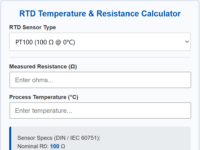
Sensor Specs (DIN / IEC 60751):
Nominal R0: 100 Ω
Sensitivity: 0.385 Ω/°C (avg)
How to use the RTD Temperature & Resistance Calculator
This specialized tool allows you to convert electrical resistance into precise temperature values, and vice versa. It supports standard platinum Resistance Temperature Detectors (Pt100, Pt500, and Pt1000) and adheres strictly to the international DIN / IEC 60751 standard curve.
The calculator operates bi-directionally and processes updates instantly as you type. Follow these simple steps to perform your calibration or verification check:
- Step 1: Select your RTD Sensor Type — Use the dropdown menu to select the nominal resistance of your sensor (e.g., Pt100 for 100 Ω @ 0°C or Pt1000 for 1000 Ω @ 0°C). The Sensor Specs box at the bottom will automatically update its nominal R0 base and average sensitivity values.
- Step 2: Enter your known value — Type a numeric value into either field to trigger an instant calculation:
- Type in the Measured Resistance (Ω) field to instantly discover the corresponding process temperature in Celsius.
- Type in the Process Temperature (°C) field to instantly find out what the electrical resistance should be.
- Step 3: Clear to Reset — If you want to start a new calculation, simply erase your entry using the backspace key. The calculator will automatically clear the opposing field and reset all values.
🔒 Smart Typing Safety & Physical Temperature Limits
- No Flashing Alerts: To prevent annoying layout changes while you are in the middle of typing a multi-digit number, the calculator includes a brief validation delay. It waits 800ms until you pause typing before checking for errors.
- Operational Limits: Platinum elements have physical operating boundaries. If a calculated or entered temperature falls outside the standard platinum limit of -200°C to +850°C, or if a mathematically impossible negative resistance is entered, the calculator border will turn red and display: “Value out of range! (-200°C to +850°C)”.
📋 IEC 60751 Allowable Resistance Ranges
To prevent math engine crashes and reflect real-world sensor behaviors, your manual inputs in the Measured Resistance (Ω) field must strictly fall within the official IEC 60751 standard boundaries:
- Pt100: Must be between 18.52 Ω (at -200°C) and 390.48 Ω (at +850°C)
- Pt500: Must be between 92.60 Ω (at -200°C) and 1952.41 Ω (at +850°C)
- Pt1000: Must be between 185.20 Ω (at -200°C) and 3904.81 Ω (at +850°C)
Note: Entering values outside these parameters (such as an extremely high resistance representing an open loop, or a 0 Ω short circuit) will immediately flag an error state.
Related topics
Leave a Comment
Your email address will not be published. Fields marked with * are required.